
Six months ago I launched MiniBreaks.io, a platform designed to bring small moments of wellness into your workday. The original vision was clear: tiny interactive experiences that help people pause during work.
I documented that entire journey in my series: "How I Built MiniBreaks.io With AI". The series explored using various AI tools for design, coding, debugging, testing, and deployment. It was a learning experiment, and I learned a lot.
But after six months, something felt off. So I made a decision: pivot the project entirely.
The Pivot Decision
I'm Not a Wellness Expert
The original platform focused on workplace mental wellness. But after building the initial set of apps, I hit a wall. Every time I asked myself "What should the next feature be?" I didn't have a good answer.
The truth: I'm not a psychologist or a wellness professional. Without that expertise, I was stuck expanding the platform in a meaningful way. The idea was good, but it wasn't the right long-term direction for me.
The AI Ecosystem Moved Fast
During those six months, the AI landscape changed dramatically. Many tools I used at the beginning:
- Improved significantly in capability
- Changed their core functionality
- Or disappeared entirely
The workflows that worked well when I first built MiniBreaks were no longer optimal. Instead of clinging to the same concept, I decided to treat this as an opportunity to restart the experiment with fresh tools and a clearer focus.
A Simpler Idea
The new direction is actually elegantly simple: MiniBreaks becomes a micro-app hub.
Tiny tools that:
- Solve one small problem
- Require no login
- Work instantly
- Take less than a minute to use
Think decision wheels, tiny calculators, random generators, simple mindfulness tools, playful utilities. Apps that fit naturally into a coffee break.
The new goal is straightforward: Ship one small app every week. After one year, the site will contain 52 tiny apps.
Before → After
- Workplace wellness platform → Micro-app hub
- Topic-focused → Tool-focused
- Hard to decide what to build → Endless small ideas
- Feature roadmap → Weekly experiments
This removes the pressure of defining a single theme. Instead, the focus becomes continuous building and experimentation.
Why Small Apps?
Most of my professional work involves large systems. Large teams. Large architectures. Long release cycles. Micro-apps are the opposite.
A good tiny tool has a few non-negotiable properties:
- The user understands it immediately
- It performs one clear action
- It produces an instant result
- It doesn't require learning anything
You open the page, click once, and you're done. There's something satisfying about that constraint. It forces clarity.
Organizing the AI Workflow
To sustain a weekly shipping cadence, I needed to scale my development process. Instead of treating AI as a single assistant, I began organizing the workflow into roles, aka, agents.
For example:
- One role helps expand and refine app ideas
- Another role focuses on implementation
- Another role checks quality, simplicity, and consistency
To support this, I created a small configuration structure inside the repository with Agents (representing roles like planner, generator, reviewer) and Skills (representing reusable workflows). If you want a deeper reference, OpenAI has a guide on skills, and Claude has documentation on agent skills.
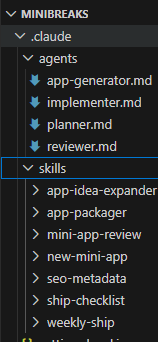
role-based agents plus reusable shipping skills.
The reviewer, for example, has clear responsibilities:
- Review apps before shipping
- Enforce UX simplicity
- Ensure MiniBreaks consistency
- Verify analytics tracking is integrated correctly
I also created domain-specific skills. The "Ship Checklist" skill, for instance, verifies that an app is ready for release by checking:
- Functionality: Does it work? Does it always generate a result?
- UX: Is there one clear action? Is there a retry option?
- Mobile: Does the layout work on small screens? Are buttons accessible?
- SEO: Does it have metadata? A descriptive title?
- Performance: No heavy assets? Loads instantly?
- Consistency: Does it match the MiniBreaks design?
- Tracking: Is analytics properly integrated?
Agent & Skill Examples
I wanted the workflow to be explicit and repeatable, so I wrote role prompts and checklists directly in the repo.
Here is a trimmed example of the reviewer role:
Role: MiniBreaks Quality Reviewer

Responsibilities:
- review apps before shipping
- enforce UX simplicity
- ensure MiniBreaks consistency
- verify usage tracking is integrated

Use skills:
- mini-app-review
	- ship-checklist
And here is the core of my ship checklist skill:
Skill: MiniBreaks Ship Checklist

Checks:
- Functionality: app works, result always generated
- UX: one clear action, retry/reset available
- Mobile: layout and buttons are usable
- SEO: metadata and descriptive title present
- Performance: no heavy assets, loads instantly
- Tracking: page-enter + primary-action usage events
The Weekly Command
Each week I start with a small idea and run a single command that orchestrates the entire workflow.
The process works like this (just one example, this app doesn't actually exist):
/weekly-ship decision spinner, with smooth animation, mobile friendly, (other requirements...)The agent then will follow the structured workflow (see below steps) to take that idea and turn it into a live app:
- Planning: Refine the idea into a specific app name, route, description, primary interaction, and result format
- Generation: Create the app, keeping it mobile-friendly with one main action, a retry option, and minimal dependencies
- Review: Evaluate clarity, simplicity, mobile friendliness, and consistency
- Refinement: Apply the reviewer's high-value feedback
- Assets: Generate SEO title, description, homepage card copy, and icon suggestion
- Summary: Document the route created, files changed, metadata, and any follow-up items
This structured workflow lets me focus on the creative part (the idea) while AI handles the execution. It's a genuinely effective partnership.
A simplified excerpt of the weekly-ship flow:
1) planner refines idea into name, route, interaction
2) app-generator builds the page and UX
3) reviewer audits clarity, simplicity, responsiveness
4) apply high-value fixes
5) generate SEO + homepage card copy
6) output release summary
Closing Thoughts
The internet used to be full of small tools. Not everything needs to be a massive platform or startup. Sometimes the best software is just a tiny tool that does one thing well.
MiniBreaks is now my experiment in building those tools — one week at a time. Some will be useful. Some will be playful. Some might be weird. But all will be small and focused.
I don't yet know what I'll end up with, but I'm genuinely excited about this new learning journey.
You can follow the experiment at minibreaks.io.